What is OpenEMR?
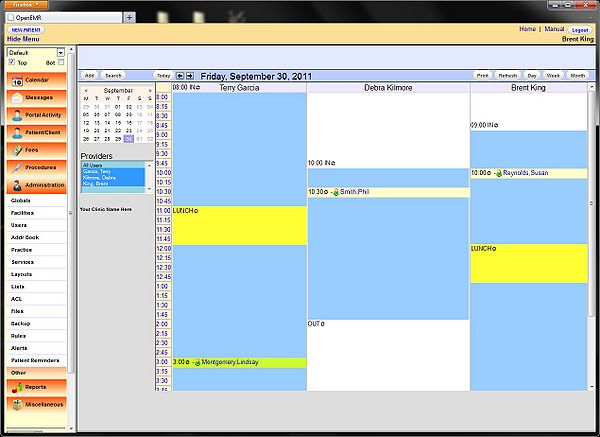
OpenEMR is an open-source electronic health record (EHR) and medical practice management solution. It is designed to help healthcare providers manage patient data, appointments, and billing information efficiently. OpenEMR is widely used in various medical settings, including dental practices, due to its flexibility, customizability, and cost-effectiveness.
Main Features of OpenEMR
Some of the key features of OpenEMR include patient scheduling, billing and insurance claims, electronic prescribing, and laboratory integration. It also provides a secure and HIPAA-compliant platform for storing and managing patient data.
Why Does OpenEMR Fail to Meet Expectations?
Common Issues with OpenEMR
Despite its popularity, OpenEMR can sometimes fail to meet the expectations of dental practices. Some common issues include data loss due to inadequate backups, difficulties with software updates, and compatibility problems with other systems. Additionally, OpenEMR’s complexity can make it challenging for users to navigate and use effectively.
Importance of Regular Backups
To avoid data loss and ensure business continuity, it is essential to implement a robust backup and restore plan for OpenEMR. This includes regular backups of critical clinic files, deduplication of archives, and encryption of backups to prevent unauthorized access.
Restore Testing Plan for Critical Clinic Files
Developing a Restore Testing Plan
A well-planned restore testing plan is crucial to ensure that critical clinic files can be quickly recovered in case of a disaster. This plan should include regular testing of backups, verification of data integrity, and documentation of restore procedures.
Best Practices for Restore Testing
Some best practices for restore testing include scheduling regular restore tests, using a variety of testing scenarios, and documenting test results. It is also essential to involve key personnel in the testing process to ensure that everyone is familiar with the restore procedures.
Download OpenEMR Free and Explore Its Features
Getting Started with OpenEMR
OpenEMR can be downloaded for free from the official website. Once downloaded, users can explore its features and customize the software to meet their specific needs. It is recommended to consult the user manual and online documentation for guidance on installation and configuration.
OpenEMR Alternative Solutions
While OpenEMR is a popular choice for dental practices, there are alternative solutions available. Some of these alternatives include proprietary EHR systems, cloud-based solutions, and hybrid models that combine on-premise and cloud-based infrastructure. When evaluating alternative solutions, it is essential to consider factors such as cost, scalability, and compatibility with existing systems.
Conclusion
Secure Data Handling with OpenEMR
In conclusion, OpenEMR is a powerful tool for dental practices, but it requires careful planning and implementation to ensure secure data handling. By understanding the importance of regular backups, developing a restore testing plan, and exploring alternative solutions, dental practices can minimize the risk of data loss and ensure business continuity. With its flexibility and customizability, OpenEMR can be a valuable asset for dental practices seeking to improve patient care and streamline operations.