What is MediTracker Dental?
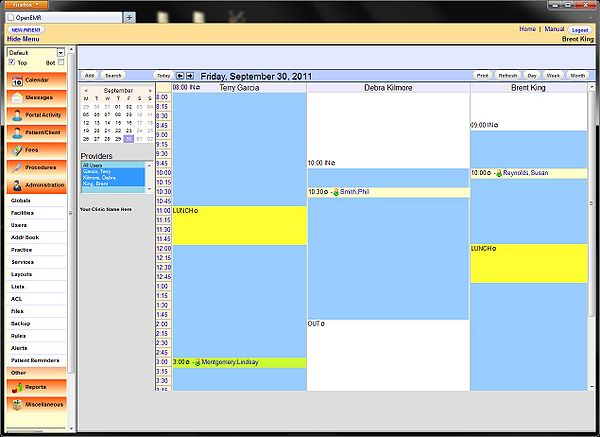
MediTracker Dental is a comprehensive electronic medical records and patient management system designed specifically for dental clinics. It offers a range of features and tools to streamline clinical workflows, enhance patient care, and improve practice management. With MediTracker Dental, clinicians can efficiently manage patient data, track treatment plans, and monitor progress, all within a secure and user-friendly interface.
Main Features
MediTracker Dental boasts an array of features that cater to the unique needs of dental clinics, including:
- Patient demographics and medical history management
- Comprehensive treatment planning and tracking
- Secure and HIPAA-compliant data storage
- Advanced reporting and analytics tools
- Seamless integration with various dental software and devices
Installation Guide
System Requirements
Before installing MediTracker Dental, ensure your system meets the following requirements:
- Operating System: Windows 10 or macOS High Sierra (or later)
- Processor: Intel Core i5 or AMD equivalent
- Memory: 8 GB RAM (16 GB recommended)
- Storage: 256 GB available disk space
Installation Steps
Follow these steps to install MediTracker Dental:
- Download the installation package from the Dents-soft website.
- Run the installer and follow the prompts to select the installation location.
- Accept the terms of the license agreement and click ‘Next’.
- Wait for the installation to complete.
- Launch MediTracker Dental and activate your license.
Technical Specifications
Data Security
MediTracker Dental prioritizes data security, employing:
- 256-bit AES encryption for data at rest
- Secure Sockets Layer (SSL) encryption for data in transit
- Regular backups and disaster recovery protocols
Audit Logs and Compliance
MediTracker Dental maintains detailed audit logs to ensure compliance with regulatory requirements, including:
- HIPAA (Health Insurance Portability and Accountability Act)
- HITECH (Health Information Technology for Economic and Clinical Health) Act
- PCI-DSS (Payment Card Industry Data Security Standard)
Pros and Cons
Advantages
MediTracker Dental offers several benefits, including:
- Streamlined clinical workflows and improved productivity
- Enhanced patient care and engagement
- Robust data security and compliance features
- Scalable and customizable to meet the unique needs of your dental clinic
Limitations
While MediTracker Dental is a powerful tool, it may have some limitations, such as:
- Steep learning curve for new users
- Dependence on internet connectivity for cloud-based features
- Potential compatibility issues with certain dental software or devices
FAQ
How to Export Data from MediTracker Dental
To export data from MediTracker Dental, follow these steps:
- Log in to your MediTracker Dental account.
- Navigate to the ‘Reports’ section.
- Select the desired report type and date range.
- Click ‘Export’ and choose the preferred file format.
Troubleshooting Sync and Import Issues with Recovery
If you encounter sync or import issues with MediTracker Dental, try the following:
- Check your internet connection and ensure it is stable.
- Verify that your software is up-to-date.
- Restart the application and try again.
- Contact Dents-soft support for further assistance.
Download MediTracker Dental Free Trial
Experience the benefits of MediTracker Dental firsthand by downloading a free trial version from the Dents-soft website.
MediTracker Dental vs Free Dental Tools
While free dental tools may seem appealing, they often lack the comprehensive features and security measures offered by MediTracker Dental. Consider the following:
- Data security and compliance features
- Scalability and customization options
- Integration with various dental software and devices
- Customer support and training resources