What is OpenEMR?
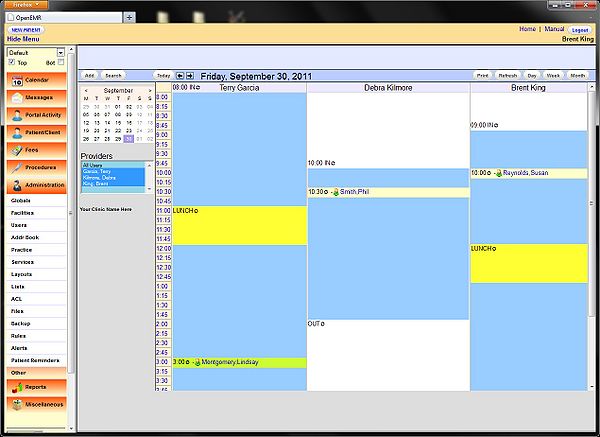
OpenEMR is an open-source electronic health record (EHR) and medical practice management solution. It is designed to help healthcare providers, including dental clinics, manage patient data, schedule appointments, and track billing and insurance claims. OpenEMR is a popular choice among healthcare providers due to its flexibility, customizability, and affordability.
Main Features of OpenEMR
OpenEMR offers a range of features that make it an ideal choice for dental practice management. Some of its key features include:
- Patient registration and management
- Appointment scheduling and reminders
- Electronic health records (EHRs)
- Billing and insurance claims management
- Reporting and analytics
Why Does OpenEMR Fail?
Despite its popularity, OpenEMR can fail in certain situations. Some common reasons for OpenEMR failure include:
Poor Configuration
OpenEMR requires proper configuration to function effectively. If not configured correctly, it can lead to errors, data loss, and system crashes.
Lack of Regular Updates
OpenEMR is an open-source software, and it requires regular updates to ensure that it remains secure and stable. Failure to update the software can lead to security vulnerabilities and system failures.
Inadequate Training
OpenEMR can be complex to use, especially for those who are not familiar with EHR systems. Inadequate training can lead to user errors, data entry mistakes, and system misuse.
Restore Testing Plan for Critical Clinic Files
To ensure that critical clinic files are safe and can be restored in case of a failure, it is essential to have a restore testing plan in place. Here are some steps to follow:
Step 1: Identify Critical Files
Identify the critical files that need to be backed up and restored, such as patient records, billing information, and insurance claims.
Step 2: Choose a Backup Method
Choose a backup method that suits your needs, such as manual backups, automated backups, or cloud backups.
Step 3: Test the Backup
Test the backup to ensure that it is complete and can be restored in case of a failure.
Download OpenEMR Free
OpenEMR is available for free download from the official website. However, it is essential to note that the free version has limited features and support. For a more comprehensive solution, consider purchasing a subscription or hiring a developer to customize the software.
Best Alternative to OpenEMR
While OpenEMR is a popular choice for dental practice management, there are other alternatives available. Some of the best alternatives to OpenEMR include:
Dentrix
Dentrix is a comprehensive dental practice management solution that offers a range of features, including patient registration, appointment scheduling, and billing and insurance claims management.
Eaglesoft
Eaglesoft is a dental practice management solution that offers a range of features, including patient registration, appointment scheduling, and billing and insurance claims management.
Curve Dental
Curve Dental is a cloud-based dental practice management solution that offers a range of features, including patient registration, appointment scheduling, and billing and insurance claims management.